



Apple Digital AV Adapter Issues
Apple iCloud How to
Can iPhone use Google FI WiFi calling?
Connect iPad/iPhone to TV - Step by step with Screenshots
Display iPhone or iPad on TV
How can I transfer photos from iPad to PC
How to add an International keyboard on iPad or iPhone
How to add apps to the bottom tray of iPad home screen
How to add Bookmark in iPad - Step by step with Screenshots
How to configure Apple Mac to access RDWeb
How to Copy and Paste Text in iPad
How to enable Recovery Mode in iPad
How to check IP address in iPad
How to check iPad software update using iTune
How to check Mac address in iPad or iPhone - Step by step with Screenshots
How to check available spaces in iPad or iPhone - Step by step with Screenshots
How to check version of iPad or iPhone - Step by step with Screenshots
How to check Serial Number in iPad or iPhone - Step by step with Screenshots
How to configure HTTP Proxy in iPad
How to configure static IP address in iPad
How to delete software on iPad and iPhone
How to deposit checks using Chase iPad App - Step by step with Screenshots
How to display iPad/iPhone to a computer
How to enable Caps Lock in iPhone or iPad
How to force to quit a apps in iPad or iPhone
How to group apps to a folder in iPad or iPhone
How to Locate your iPhone/iPad on a map
How to mirror iPhone to Apple TV 4K
How to move apps icon from one screen to another in iPad
How to Organize your apps with folders
How to renew IP address on iPad
How to reset network on iPad or iPhone
How to Restore iPad in iTune
How to select default Search Engineer in iPad - Step by step with Screenshots
How to select language in iPad
How to send photo via email in iPad
How to Set a passcode lock remotely in iPad or iPhone
How to setup Auto-Lock in iPad
How to setup Cisco VPN on iPad
How to setup Enterprise wireless on iPad
How to setup Exchange email in iPad
How to setup Passcode Lock in iPhone or iPad
How to setup Wireless on iPad
How to split keyboard on iPad - Step by step with Screenshots
How to switch Apple Store between Languages/Country - Step by step with Screenshots
How to switch keyboard in iPad or iPhone
How to take a screenshot on iPhone
How to transfer files between iPad and PC
How to Transfer Photos from iPhone or iPad to a Computer
How to transfer photos from Computer to iPad/iPhone using iTune
How to transfer purchases from an Apple device to an authorized computer
How to transfer video files from computer to iPad or iPhone:
How to Turn down brightness to save battery life in iPad
How to use Chase iPad App - Step by step with Screenshots
How to use Remote Desktop Lite to access Windows PC in iPad and Android
iPad Wireless Configuration
Place a call on hold on iPhone
Printing wirelessly on iPhone or iPad
Rearrange Application Icons in iPad
Save or copy image in iPad
Switch default search engine in iPad
Which free GPS for iPhone or iPad do you recommend?
How to Copy and Paste Text in iPad
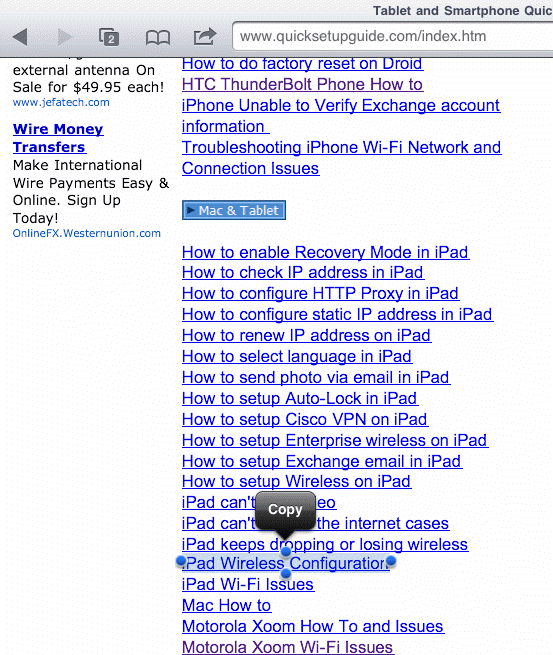
1. Just tap and hold a word, then use your finger to drag to select whole text you want to copy.
2. Copy it.
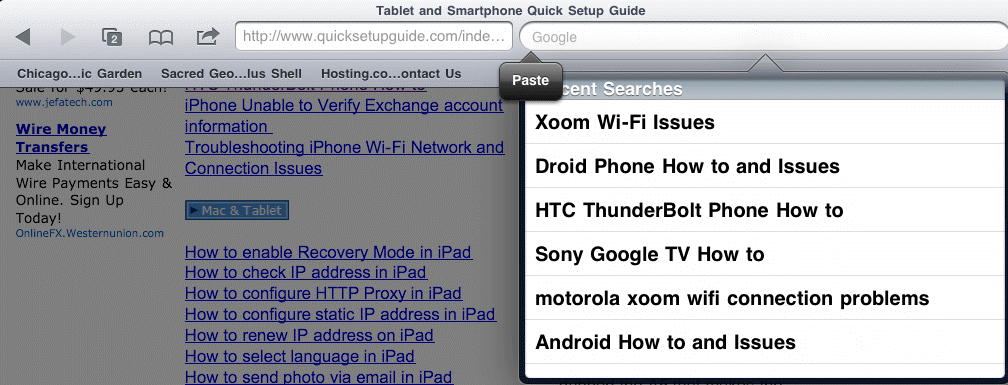
3. Go to the place you want to paste, tap and hold in the input box.
4. Paste it.
To select a whole paragraph the easy way, just tap it 4 times to highlight the entire paragraph, then use Copy.