Bob Lin Photography services
Real Estate Photography services




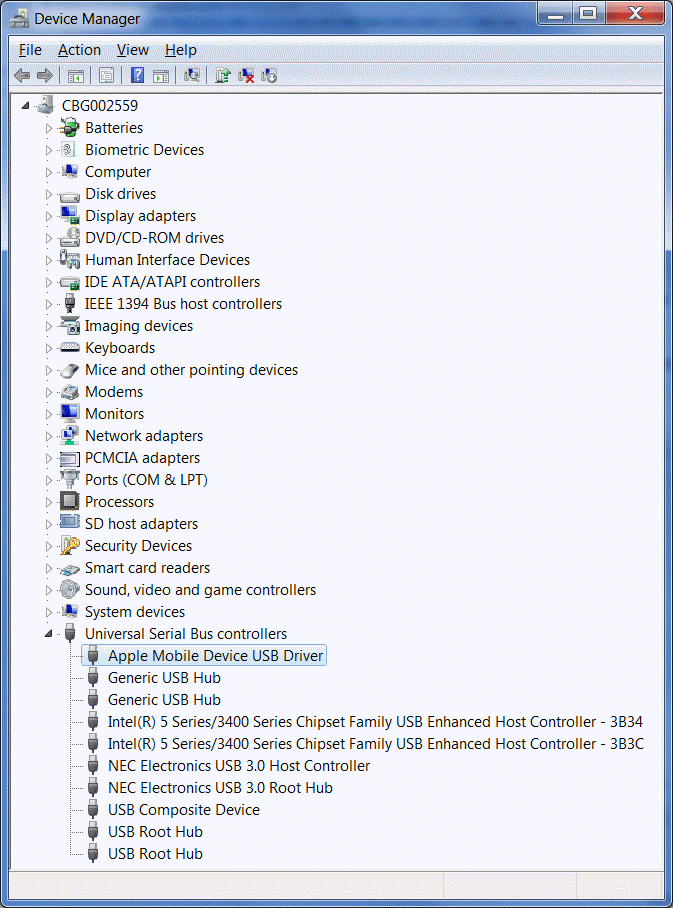
iOS devices such as iPad and iPhone require Apple Mobile Device USB Driver installed on your computer. By design, Apple Mobile Device USB Driver should be automatically installed when the iPad or iPhone connects to a computer. Your Apple device may have a problem to sync if Apple Mobile Device USB Driver is not installed on the computer the device connecting to. Here is the steps to verify whether it is installed on Windows PC.
1. Connect the device to the computer.
2. Click the Start menu, right-click on Computer, and choose Properties.
3. In the upper-left corner, click Device Manager. The Device Manager window should open.
4. Click the plus (+) icon next to Universal Serial Bus controllers to expand this selection.
5. Locate the Apple Mobile Device USB Driver in this list. If this entry is displayed without any downward arrow, "!" or "?" symbols over it, then this driver is successfully installed. Proceed to the next section titled "Check for third-party mobile phone software".